Trending photo styles show up on Instagram and YouTube Shorts almost weekly, and most of them are now made with a single well-written AI prompt. This page collects five of the most popular ones. Each has a Copy Prompt button, so you can grab the whole prompt without selecting text by hand.
Upload your photo to your AI image tool, paste the prompt, and generate. That’s the whole process.
What These Prompts Cover
The set is deliberately mixed, so you can try different looks:
A realistic couple mirror selfie
A moody rooftop portrait styled as a phone lockscreen
A cinematic side-profile portrait of a young man
A saree face-swap edit that keeps the original photo’s styling
A clean “place this person into another photo” composite
Some prompts need one uploaded photo, and the last two need two. The notes under each prompt say what to upload.
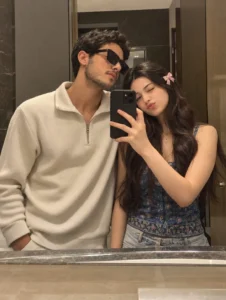
Prompt 1 — Couple Mirror Selfie
Generate an ultra-realistic mirror selfie of a young couple standing close together in front of a large bathroom mirror, as if taken on an ordinary phone.
POSE AND FRAMING:
The man stands on the left and the woman on the right, shoulder to shoulder, both looking at the mirror. The woman holds a black smartphone upright in front of her, so it partly covers the middle of the frame. The man stands just behind her side and leans in naturally. Frame both from the chest or waist up.
HIM:
Thick, slightly tousled black hair with natural volume, a short neat beard and moustache, and a relaxed expression with a faint closed-mouth smile. He wears a cream, off-white textured half-zip sweater.
HER:
Long, softly wavy dark-brown hair. She gives the mirror a playful wink with a small, cute pout. She wears a colorful blue patterned top and a small soft pink bow clip on one side of her hair.
SCENE AND LIGHT:
Warm indoor bathroom lighting, a big clean mirror, a neutral beige-and-brown bathroom behind them, accurate mirror reflections, believable hands and fingers.
LOOK:
Candid smartphone quality with natural skin texture, true-to-life proportions and slight softness. No studio feel, no heavy HDR, no plastic skin, no beauty filter, no over-sharpening, no artificial blur.
IDENTITY:
If reference photos are uploaded, keep each person’s face exactly as it is: same face shape, eyes, brows, nose, lips, jawline, skin tone, hairline and age. No face mixing, no retouching, no reshaping. The result should read as a genuine everyday phone photo.
Best For: Couple profile photos, Instagram posts, anniversary and relationship content
Recommended Aspect Ratio: 3:4 (4:5 also works for Instagram)
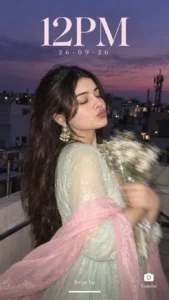
Create an ultra-realistic candid close-up of the woman from my reference photo, designed as a phone lockscreen wallpaper, shot at blue hour under a dusky lavender-purple sky.
She stands on an urban rooftop with her body turned slightly away and her eyes gently closed, holding a bouquet of small white flowers in both arms. Show strong motion blur on her hands and the flowers.
She wears a pastel mint-green Anarkali with delicate flowing detail, a sheer baby-pink dupatta draped loosely over her shoulders and arms, statement earrings, and long hair in motion. Keep her facial features, skin texture, warm blush and glossy lips exactly true to the reference.
Behind her: city buildings, rooftop railings and the silhouette of a mobile tower, all kept dark. A direct camera flash lights her brightly against the dim background.
Give it an early-2000s digital camera feel: soft focus, flash glow, light grain and a candid mood.
Add lockscreen text reading “12PM”, “26-09-26”, “Swipe Up” and “Camera”.
Best For: Phone wallpapers, aesthetic Instagram stories, moody portrait edits
Recommended Aspect Ratio: 9:16
Customizable Elements: Outfit and dupatta colors, flower type, lockscreen time and date, sky color
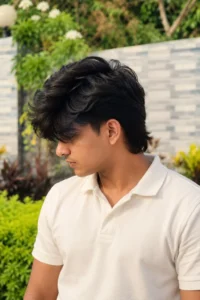
Prompt 3 — Cinematic Side-Profile Portrait
Create an ultra-realistic cinematic close-up portrait using the reference image as inspiration. Show a young Indian man in side profile, looking toward the left of the frame.
His hair is thick, wavy and naturally messy, with long layered strands falling across his forehead and partly over his eyes, and a slightly longer mullet-style back. Give him a defined jawline, a straight nose, natural lips, believable skin texture and a realistic complexion.
Use cinematic lighting, shallow depth of field and a clean, softly blurred background. No text or watermark.
Best For: Profile pictures, moody male portraits, hairstyle visualisation
Recommended Aspect Ratio: 4:5
Customizable Elements: Hair length and style, lighting color, background tone, facing direction
Prompt 4 — Pink Saree Face Swap
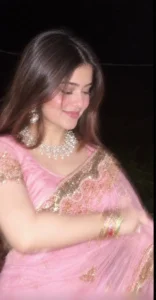
Create a photorealistic image using the FIRST uploaded image as the exact blueprint for the scene: composition, pose, saree, jewelry, lighting, camera angle, framing, background and overall look.
Use the SECOND uploaded image only as the face and identity reference. Swap the woman’s face in the first image with the face from the second image, keeping the second person’s natural, recognizable identity.
IDENTITY:
Keep the second person’s real face shape, eyes, eyebrows, nose, lips, jawline, skin tone and other distinguishing features. Do not beautify, restyle or noticeably change the face, and do not let it turn into someone else.
KEEP FROM THE FIRST IMAGE:
– The pink saree with detailed gold embroidery and decorative border, draped the same way
– The same blouse design and color
– The same jewelry, including the statement necklace, the earrings and the colorful bangles
– The same hairstyle, with loose hair framing the face
– The same seated pose, arm placement, head tilt and downward gaze
– The same soft, natural smile
– The same close-up framing, camera perspective and depth of field
– The same near-black night background with warm flash and soft light
The result should look as if the second person was always in the first photograph. Keep clothing, body proportions, composition, lighting and background faithful to the first image.
Aim for natural realism: believable skin texture, fine facial detail, individual hair strands, accurate fabric texture and authentic reflections on the jewelry.
Do not add text, watermarks, extra people, extra accessories or unnecessary objects.
SUMMARY:
The first image decides the scene, pose, outfit, styling, composition and lighting. The second image decides facial identity only.
Best For: Traditional saree portraits, festival photo edits, face-swap into a reference look
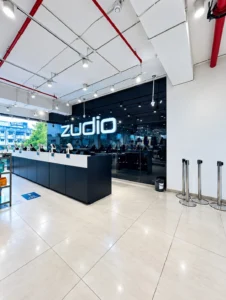
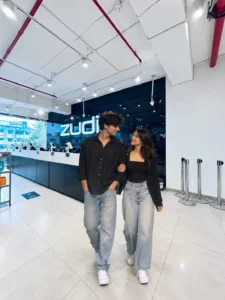
Take the person from the first uploaded photo and place them into the second uploaded photo so they look like a natural part of that scene. Match their lighting, scale, perspective and color tone to the second photo, and change nothing else.
Keep the background of the second photo completely untouched. Do not alter the person’s face or body size.
Upscale the final image to 8K quality with a 3:4 aspect ratio.
Best For: Travel photo composites, adding a person to a location shot, group photo fixes
Recommended Aspect Ratio: 3:4
Customizable Elements: Person’s position in the scene, output resolution, aspect ratio
How to Create This Edit
Open an AI image generator that accepts photo uploads.
Upload the right photos. Prompts 1 to 3 need one clear photo. Prompts 4 and 5 need two, in the order the prompt describes (first image, then second).
Pick a prompt and click Copy Prompt.
Paste it into the prompt box.
Set the recommended aspect ratio shown under the prompt.
Generate the image.
Check the face, hands, jewelry, and background for errors.
Regenerate or tweak the wording if something looks off.
Save the best version.
Generate a few versions before you decide. Results differ from run to run and from tool to tool.
Tips for Better Results
Use sharp, well-lit source photos. A blurry upload gives the AI weak identity data.
Face forward for face-based edits. A clear, front-facing photo works better for Prompts 1, 2, and 4.
Change one thing at a time. If you swap the outfit, lighting, ng and background at once, it’s hard to tell which change broke the result.
Add what you don’t want. Lines like “no text, no watermark, no extra people” help keep the output clean.
Match the aspect ratio to where you’ll post. Use 9:16 for stories and wallpapers, and 4:5 or 3:4 for feed posts.
A detailed prompt usually beats a short one. These are the details worth including: camera angle, lighting, background, outfit, pose, expression, color palette,tte and photo style.
Here is a short example you can adapt: A realistic portrait of a young man on a mountain ridge at golden hour, black jacket, warm low sun, layered clouds behind him, shallow depth of field, shot like an 85mm lens photo, natural skin texture and true-to-life colors. Swap in your own location, clothing, and lighting.
Tools You Can Try These Prompts In
Any AI image tool that supports detailed prompts can work, and the ones with photo upload are best for these edits. Common choices include ChatGPT, Google Gemini, Grok, Midjourney, Flux, Ideogram, Leonardo, and Recraft. Features and upload support change often, so check what your tool currently allows before you start.
Who These Prompts Are For
They suit content creators, Instagram users, bloggers, designers, photographers, digital artists, students, and small business owners. If you want a trending look without learning editing software, they save time.
FAQs
Are AI photo editing prompts free to use?
The prompts here are free to copy. Whether the AI tool is free depends on the platform, and some limit uploads or resolution unless you pay.
Do I need editing experience?
No. You copy the prompt, upload your photo, and generate. Learning to adjust the wording comes with practice.
Why doesn’t my result match the prompt exactly?
AI tools interpret prompts differently, and the output changes with each run. Try again, switch tools, or simplify the prompt.
Will the AI keep my face accurate?
Several of these prompts tell the AI to preserve identity, but no prompt guarantees it. Always check the face and regenerate if it drifts.
Can I change the outfit or background?
Yes. Edit the outfit, setting, and colors in the prompt text before generating. The “Customizable Elements” note under each prompt shows what’s safe to change.
What does the aspect ratio change?
It sets the shape of the image. Use the recommended ratio for the best fit, or change it to match your social platform.
Final Thoughts
You don’t need editing software or years of practice to make a polished, trending image. Pick a prompt, upload your photo, and generate. We’ll keep adding new viral AI photo prompts to Prompt Pao, so check back for fresh styles.