

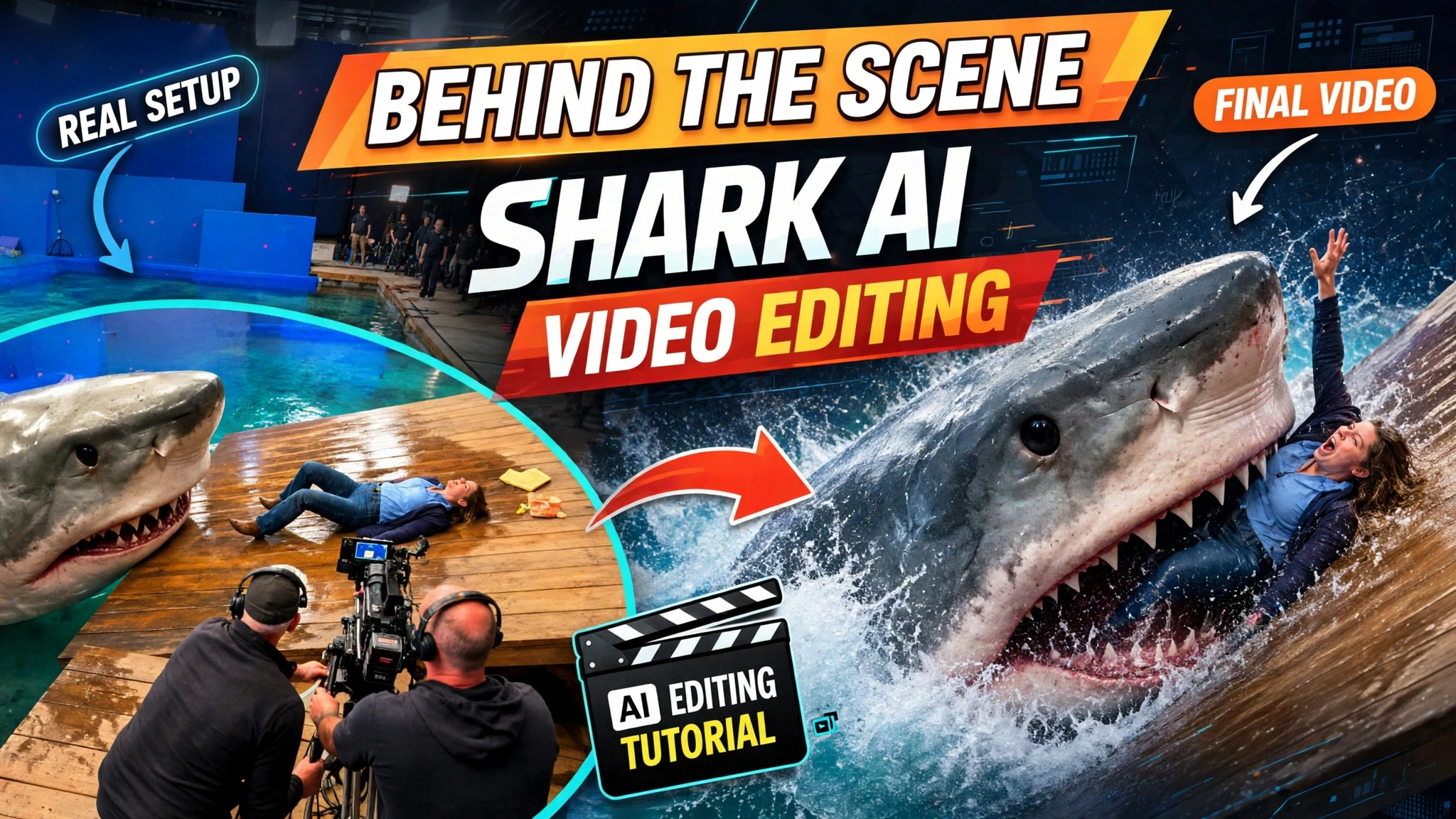
There is a reason behind-the-scenes videos outperform the finished movie clip. The finished clip shows you a shark. The behind-the-scenes clip shows you how the shark was made — the water tank, the blue walls, the tracking markers, the camera crew in black, the lighting rigs, the wet wooden platform — and suddenly the terrifying scene becomes fascinating instead of just scary. People watch twice: once for the shark, once to spot how it was filmed.
That is the whole trick of this trend. It is not a shark attack video. It is a video of a shark attack being filmed. The crew stays in frame, the cinema camera stays visible, the studio stays visible, and the shark stays a movie creature — an animatronic or high-end CGI practical effect, part of a production, not a real animal in an uncontrolled environment. Remove the crew and the camera, and you do not have a better video — you have a different, misleading one.
This post has two prompts, in order, because the workflow has two steps. Prompt 1 generates the behind-the-scenes photograph. Prompt 2 turns that photograph into a 10-second behind-the-scenes video. Skip Prompt 1 and go straight to video, and you lose the exact set, the exact shark and the exact framing that make the video believable.
Why the BTS Angle Works
A finished movie scene asks you to believe in it. A behind-the-scenes clip asks you to admire how it was built. The second question is more interesting, and it keeps people watching longer, because there is more to look at: the camera operator adjusting, the crew watching, the water splashing on wood, the red tracking markers on blue walls that quietly tell you “this is a set.”
The hook, in one sentence, is this: “This terrifying shark movie scene is actually being filmed on a soundstage.” Every detail in both prompts exists to prove that sentence — the chroma walls, the markers, the softboxes, the trusses, the cables, the headphones, the cinema camera seen from behind with its monitor, lens and cables. If a generation hides any of that, it has weakened the hook.
The same image-first, video-second discipline is behind the night bike reel in my viral girl on Bullet bike AI video edit — a locked reference image first, a timed video second.
Prompt 1 — The Behind-The-Scenes Photograph
Generate this first, in an image tool such as ChatGPT. Vertical 9:16, realistic smartphone / social-media BTS photography — not a poster, not fantasy artwork, not a game screenshot, not an advertisement, not a polished cinematic frame.
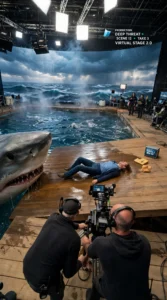
The set: a huge indoor movie studio with a large shallow turquoise-blue water tank. Walls covered with bright blue chroma-key panels and numerous small red motion-tracking markers. Large professional softbox lights, overhead lighting rigs, metal trusses, cables and studio equipment clearly visible.
The foreground: two male film crew members in black production clothing and professional headphones, operating a large cinema camera mounted on a heavy-duty tripod / dolly. The camera must be clearly visible from behind — monitor, lens, cables, camera body, support equipment.
The staged scene: on a wet wooden movie-set platform beside the water tank, a female stunt performer in a casual blue long-sleeve shirt, dark blue jeans and brown boots, lying dramatically on the platform as part of a staged shark attack scene. A gigantic realistic great white shark is emerging from the water beside her — a movie creature, animatronic or high-end CGI practical effect, with realistic wet grey skin, detailed eyes, teeth and water droplets. Its mouth is open dramatically near the stunt performer, but the scene is clearly controlled filmmaking, not a real attack.
The background: several additional crew members, production assistants, lighting equipment and safety personnel, watching the shot.
The look: natural imperfect handheld framing, slight lens distortion, realistic motion softness, practical studio lighting, wet reflections on wooden boards, believable water splashes, realistic human proportions, documentary BTS photography, high-end film production, photorealistic textures. No text, no watermark, no logo, no subtitles, no extra limbs, no distorted faces, no duplicated crew members, no malformed camera equipment.
How to Create the Image
- Copy Prompt 1 from the box above.
- Click the Create Image option in your image tool and generate the image with this prompt.
- Once the image is generated, save it within a few seconds — do not lose the best version by generating over it.
- Check it before you move on: is the cinema camera clearly visible from behind? Are the blue walls and red markers visible? Is the shark clearly a movie creature on a set, not a real animal in an ocean? Is there any text, watermark or duplicated crew member? If any of those fail, regenerate the image — a weak first frame cannot be saved by a good video prompt.
Prompt 2 — The 10-Second Behind-The-Scenes Video
Now take the image from Prompt 1 into a video tool such as Google Flow AI. Upload the image, paste Prompt 2, keep the size at 9:16, and send it.
This prompt repeats the concept three times, in different words, because it is the easiest thing for a video tool to get wrong: this is NOT the finished movie, NOT a real shark attack, NOT found footage. It is a behind-the-scenes production video showing a film crew shooting a staged shark attack scene using a giant movie creature / animatronic shark and visual effects. It should feel like an authentic viral BTS reel recorded by someone standing behind the film crew.
The action is one continuous shot, timed:
- 0–2 seconds: Start from behind the film crew. The cinema camera and two camera operators dominate the foreground. Beyond them, the female stunt performer lies on the wet wooden platform beside the water tank. The giant shark is partially visible at the edge of the water.
- 2–4 seconds: The stunt performer begins sliding slightly down the wet wooden ramp toward the water as part of the staged stunt. The camera crew immediately tracks her movement. The giant shark slowly rises from the water beside the ramp.
- 4–6 seconds: The shark lunges upward in a controlled movie-stunt movement. Its huge mouth opens dramatically near the performer. Water splashes onto the wooden platform. The camera crew remains in the foreground and continues filming.
- 6–8 seconds: The shark’s head moves closer to the performer while she reacts dramatically and tries to move backward up the ramp. The camera operator adjusts the cinema camera to follow the action. The giant creature should feel physically massive and heavy.
- 8–10 seconds: The shark reaches the performer for the dramatic movie moment, but the framing still clearly shows the camera crew and studio environment. End with the crew continuing to film while the shark remains beside the ramp.
Camera style: vertical smartphone BTS footage, handheld human perspective from behind the camera crew, slight natural camera shake, occasional tiny framing corrections, realistic autofocus behaviour, natural exposure changes from bright studio lights. No impossible camera movements, no drone shot, no cinematic crane shot, no perfectly stabilised footage.
The non-negotiables at the end: the shark is a fictional movie creature, created for a film production using practical effects, animatronics and/or CGI, and must never look like a real animal attacking people in an uncontrolled environment. The blue chroma-key walls, tracking markers, lighting rigs, camera equipment and crew must remain visible throughout, so the audience immediately understands this is a movie set. Do not transform the footage into the finished shark movie. Do not remove the film crew. Do not hide the cinema camera. Do not make the background look like an ocean. Do not make it look like a news report or real-life attack.
How to Create the Video
- Copy Prompt 2 from the box above.
- In your video tool, click Generate Video, sign in with your Google account if asked, then click New Project.
- Paste the prompt, upload the image you generated with Prompt 1, and send it, keeping the size at 9:16.
- The image will be generated into a video in a short while — do not send the same prompt twice while the first run is still going.
- Watch the whole ten seconds before downloading. Check it against the timeline: crew in foreground at 0–2, slide and shark rise at 2–4, lunge and splash at 4–6, reaction and camera adjustment at 6–8, dramatic moment with crew still visible at 8–10.
- Download the video. Add a caption or trending audio in the Reels editor if you want it — and keep the caption honest: this is a behind-the-scenes movie edit, not real footage.
The same timed, single-shot discipline is behind the couple coffee video in my viral Cofi trend couple coffee video prompt — a locked reference first, a timed performance second, nothing invented.
Small Habits That Keep the BTS Illusion Working
Keep the crew in frame, always. The crew is not clutter to be cropped out. They are the proof. A generation that pushes the crew out of frame and centres only the shark has turned a BTS clip into a fake attack clip — and lost the trend’s whole point.
Let the footage stay imperfect. Slight shake, tiny framing corrections, autofocus hunting, exposure shifting under bright studio lights — these are what make BTS footage feel real. A perfectly stabilised, perfectly lit, crane-smooth version will read as a finished movie, not a set visit.
Check the water, not just the shark. Believable splashes on the wooden platform, wet reflections on the boards, droplets on the wood — these sell the tank as a physical set. A shark that moves without disturbing water has broken physics, and viewers notice it before they notice the shark’s teeth.
Watch the shark’s weight. A giant creature should feel massive and heavy, especially in the 6–8 second beat where its head moves closer. A shark that darts or floats lightly reads as a game asset, not a practical movie creature.
When the Video Comes Out Wrong
The crew disappears and it becomes the finished movie. The most common failure, and the prompt forbids it three times. Regenerate with the full prompt, and check that Prompt 1’s image itself shows the crew and camera clearly — a video cannot keep what its first frame does not have.
The background becomes an ocean. The set was lost. The chroma walls, markers and lighting rigs must stay visible throughout. Regenerate, and if it repeats, use a stronger Prompt 1 image where the blue walls dominate the background.
The camera movement is impossible — drone, crane, perfectly smooth. The prompt forbids all three. Regenerate with the full camera-style section intact; do not shorten it, because that section is the only thing keeping the footage handheld.
The shark looks like a real animal in a real attack. The fictional-creature framing was lost. Regenerate, and keep the crew, camera and studio environment visible — they are what mark it as a movie, not just the shark’s design.
The performer or shark warps, or extra limbs appear. Image-to-video models struggle with complex interaction. Regenerate from the same Prompt 1 image; a fresh run usually lands the interaction more cleanly than a follow-up edit trying to fix it.
The timing is off — lunge too early, or no dramatic moment at the end. Check the result against the 0–10 second timeline, beat by beat. A video that ends before the 8–10 second moment feels unfinished, because the dramatic beat is the payoff the whole clip builds toward.
FAQs
Do I need two prompts, or can I skip straight to video?
You need both, in order. Prompt 1 builds the exact set, shark and framing. Prompt 2 animates that image with a timed BTS performance. Skipping Prompt 1 means the video tool invents its own set, and the BTS details that make this trend work are the first things it drops.
Is this a real shark attack video?
No. It is a fictional behind-the-scenes video of a shark movie being filmed on a soundstage, with a movie creature, a stunt performer, a camera crew and studio equipment visible throughout. Post it with that framing, not as real footage.
Can I use this method for other movies?
Yes. The reference tutorial makes the same point: the BTS method works for a movie, a web series, a cartoon or anything else with behind-the-scenes footage, because the appeal is the same — showing how a polished scene is actually made, in its raw, authentic form. Keep the crew and the set visible, whatever the subject.
What tools do I need?
An image tool for Prompt 1 (the tutorial uses ChatGPT for the photo), and a video tool for Prompt 2 (the tutorial uses Flow AI, with Google sign-in, New Project, paste prompt, upload image, 9:16, send). Video generation availability and limits vary by account.
Why does my video look like a finished movie instead of BTS?
Because the crew, camera or studio environment was removed or pushed out of frame. Those are the BTS markers. Regenerate with the full prompt and a Prompt 1 image where they dominate the frame.
Can I make it longer than 10 seconds?
The prompt is written for the reference’s exact 10 seconds and one continuous shot. A longer version would need a new prompt built around additional beats, not a longer setting on this one — extending the dramatic moment past 10 seconds just makes a staged beat feel frozen.
